
Cómo permitir jugadores no premium (Pirata)
El modo "No Premium" permite que los jugadores que no tienen una cuenta premium de Minecraft Java Edition puedan conectarse a tu servidor. Sigue los pasos a continuación para habilitar esta configuración en tu servidor.
Paso 1: Accede al archivo de configuración del servidor
- Inicia sesión en el panel de control: https://panel.xerohost.net.
- Selecciona el servidor que deseas configurar.
- En el menú de la izquierda, dirígete a la sección "Properties".
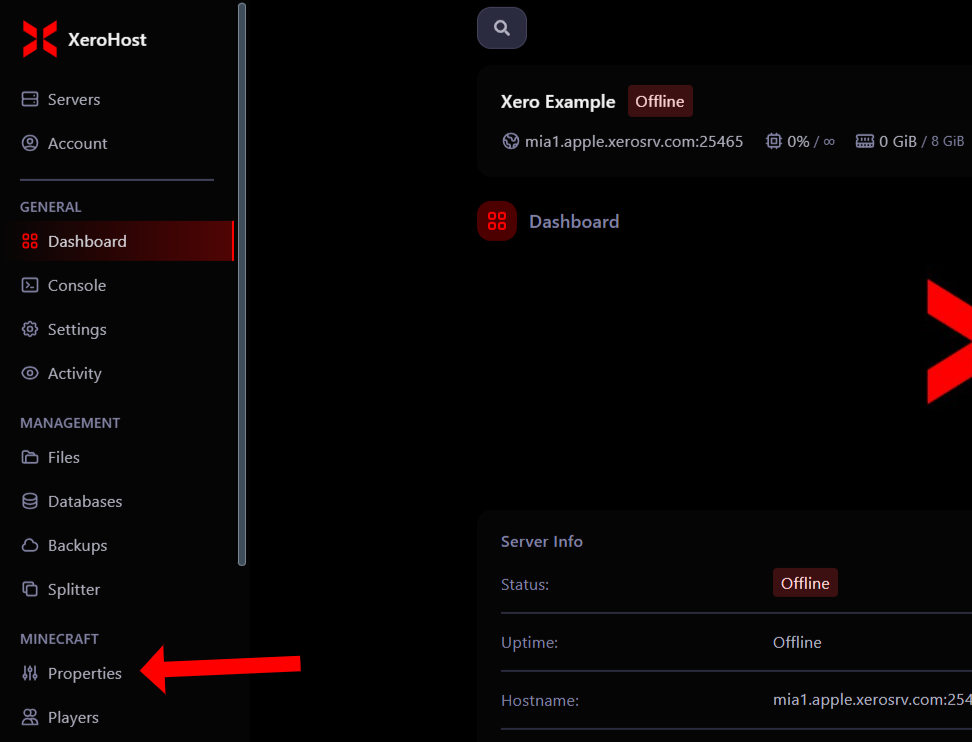
Paso 2: Cambia las configuraciones necesarias
Dentro de la sesión Properties, realiza los siguientes cambios:
-
Busca la casilla que dice:
online-mode -
Busca la casilla:
enforce-secure-profile


Paso 3: Guarda y reinicia el servidor
- Guarda los cambios realizados.
- Reinicia tu servidor para aplicar la nueva configuración.
Notas importantes sobre el modo No Premium
-
Seguridad:
- Cuando el servidor está en modo No Premium, no se verifica la autenticidad de las cuentas que se conectan.
- Instala un plugin de autenticación como nLogin o AuthMe ReLoaded para proteger las cuentas de los jugadores.
-
Plugins recomendados:
- nLogin (Recomendado): Solicita a los jugadores registrarse y autenticarse al unirse al servidor.
- AuthMe ReLoaded: Solicita a los jugadores registrarse y autenticarse al unirse al servidor.
-
Problemas Comunes:
- Si los jugadores no pueden unirse, asegúrate de que ambas opciones (online-mode y enforce-secure-profile) estén configuradas en false.
- Verifica que el servidor haya sido reiniciado después de realizar los cambios.
Ventajas del modo No Premium
- Permite que más jugadores, incluyendo aquellos sin cuentas premium, puedan unirse a tu servidor.
- Ampliarás tu comunidad al no limitar la entrada solo a jugadores con cuentas premium.
¡Y listo! Ahora tu servidor está configurado en modo No Premium. ¡Recuerda instalar los plugins necesarios para mantener tu servidor seguro y funcional!